
Building an AI-Powered Web Scraper with Ollama & ChromaDB
A Step-by-Step Breakdown of a Python Script for Intelligent Web Scraping and Q&A
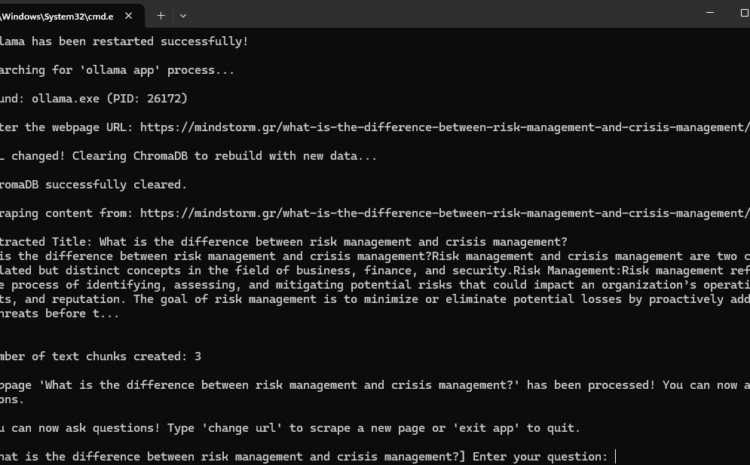
In this blog post, we’ll analyze a Python script that automates web scraping, text processing, and AI-powered question answering using Ollama and ChromaDB. This script is a powerful tool for extracting website content and enabling users to ask questions about the extracted data interactively.
View the script: RAG Web Scraper 6
What Does This Script Do?
This Python script:
- Detects and Stops Running Ollama Processes ✅
- Restarts Ollama to Ensure a Fresh AI Model is Running
- Scrapes Webpage Content Dynamically
- Extracts and Displays the Webpage Title
- Processes and Stores Text Data in ChromaDB for Fast Retrieval ️
- Uses Ollama’s AI Model to Answer User Questions
- Allows Users to Change URLs & Scrape Different Pages Without Restarting
Let’s break down how each part of the script works.
1️⃣ System Information & Ollama Process Management
The script starts by printing system information and managing Ollama processes to avoid conflicts.
Checking System Information
Before starting, the script prints:
- Operating System Name
- Platform Details
- CPU Core Count
- Available Memory Details

Stopping Any Running Ollama Processes
The script checks for existing Ollama processes and terminates them to ensure a clean restart:

Restarting Ollama
Once all running instances are stopped, the script restarts Ollama to serve AI models.

2️⃣ Web Scraping & Dynamic Content Extraction
The script asks the user for a URL and extracts content from the page.
Asking for the Webpage URL

Extracting the Page Title
The script looks for the
tag and extracts the article title.

Extracting the Article Content
The script then extracts the main article content inside

Storing Extracted Text as a Document
To process the extracted text efficiently, it is wrapped in a Document object (from LangChain).

3️⃣ Text Processing & ChromaDB Storage
The extracted text is split into smaller chunks and stored in ChromaDB for fast retrieval.
✂️ Splitting the Text into Chunks
To enable efficient question-answering, the script splits the text into small, searchable chunks.

Storing Data in ChromaDB
The text chunks are converted into vector embeddings and stored in ChromaDB.
from langchain_ollama import OllamaEmbeddings
from langchain_community.vectorstores import Chroma
local_embeddings = OllamaEmbeddings(model=”all-minilm”)
vectorstore = Chroma.from_documents(documents=all_splits, embedding=local_embeddings, persist_directory=”chroma_db”)
4️⃣ AI-Powered Question Answering
Once the content is processed and stored, the script allows the user to ask questions about the article.
Interactive Q&A Loop
Users can ask multiple questions without restarting the script.

Retrieving Relevant Information
When a question is asked, ChromaDB retrieves the most relevant text chunks.

Answering the Question with AI
The retrieved text is sent to the Ollama model for generating a response.

Displaying the Answer

5️⃣ Additional Features
Changing the URL Without Restarting
Users can type "change url" to scrape a new webpage dynamically without restarting the script.

Key Takeaways
✔️ Automates web scraping and AI-powered Q&A
✔️ Handles dynamic URL changes efficiently
✔️ Uses ChromaDB for fast text retrieval
✔️ Manages system processes, ensuring Ollama runs smoothly
✔️ Provides a continuous chatbot-like experience
Final Thoughts
This Python script is a powerful AI-driven tool that combines web scraping, vector search, and AI question-answering into one seamless workflow. It can be used for automated research, knowledge extraction, and real-time information retrieval.
Would you like to integrate this into your own projects? Send me an email: info@mindstorm.gr !