
Edit Content

About Us

We must explain to you how all seds this mistakens idea off denouncing pleasures and praising pain was born and I will give you a completed accounts off the system and expound.

Contact Info

 How to compare images between two folders and copy matching images to a third folder

What this Code Does

This Python script is a GUI-based tool for comparing images between two folders using perceptual hashing (pHash). It identifies visually similar images, allowing the user to copy matching images to a third folder. Below is a breakdown of the main components:

Compare imagesYouTube link: https://youtu.be/yZfYzlNj1so


1. Comparing Images

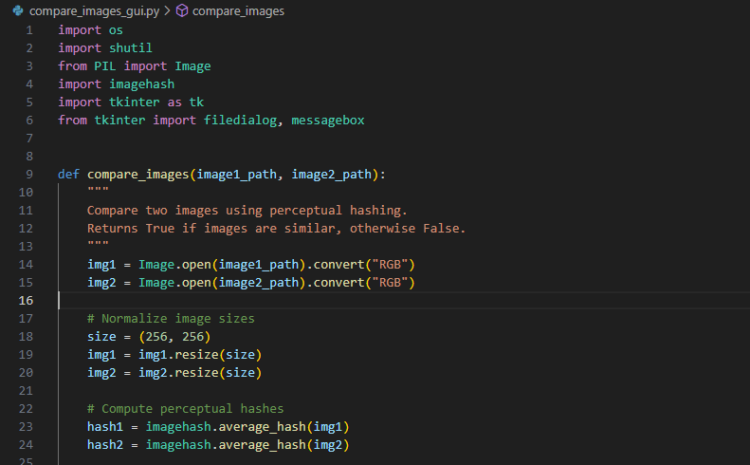
The function compare_images uses the Pillow library and imagehash to compare two images:

  • The images are resized to a standard size (256×256 pixels) to normalize them for comparison.
  • Perceptual hashes (pHash) are computed for both images, and the Hamming distance between the hashes is compared.
  • If the distance is below a specified threshold (max_difference), the images are considered visually similar.

2. Finding and Copying Matches

The function find_and_copy_matching_images:

  • Iterates through all image files in two folders (source_folder and target_folder).
  • Compares each image from the source folder against all images in the target folder using compare_images.
  • If a match is found, the matching image is copied to the output folder (output_folder).
  • Stops comparing a source image once a match is found, saving time.

3. Clearing the Output Folder

The function clear_output_folder ensures the output folder is emptied before new matches are copied:

  • Deletes all files and subdirectories in the folder.

4. GUI Functionality

The create_gui function provides a graphical user interface using Tkinter:

  • Input fields: Users can select two input folders (folder1 and folder2) and an output folder (folder3).
  • Action Buttons: Two buttons let users:
    • Copy matching images from folder1 to folder3.
    • Copy matching images from folder2 to folder3.
  • Folder Selection: The select_folder function opens a folder browser to choose directories.
  • Notifications: Users are informed of success or failure using message boxes.

5. Starting the Comparison

  • From Folder1 to Folder3: start_comparison compares images in folder1 against folder2 and saves matches to folder3.
  • From Folder2 to Folder3: start_comparison_reverse does the same but swaps the source and target folders.
  • Both functions ensure folder3 is created and cleared before saving new matches.

6. Perceptual Hashing (pHash)

  • Perceptual hashing generates a hash based on the image’s appearance rather than its binary data.
  • Small differences in appearance (e.g., slight color variations) are tolerated, making this method effective for detecting similar images even if they are not pixel-for-pixel identical.

7. Centering the Window

The center_window function calculates the center position for the Tkinter window, ensuring it appears centered on the user’s screen.


Use Case

  • A user can use this tool to detect and manage duplicate or similar images, for example:
    • Identifying similar product images in e-commerce directories.
    • Organizing photo libraries by finding near-duplicates.

Key Libraries Used

  • os and shutil: Handle file and folder operations.
  • Pillow (PIL): For image processing (opening, resizing).
  • imagehash: For perceptual hashing.
  • Tkinter: For GUI development.

How to Run

  1. Install required libraries if not already installed:
    pip install pillow imagehash
    
  2. Save the script as compare_images_gui.py and run it:
    python compare_images_gui.py
    
  3. Use the GUI to select the folders and perform the comparison.

Output

  • Matching images are copied to a subfolder named folder3 within the specified output folder.
  • A success message displays the number of matches found, or a no-match notification is shown if none are found.

Download compare_images_gui in zip format…

Python filename compare_images_gui.txt is inside the zip filename compare_images_gui.

Rename compare_images_gui.txt to filename: compare_images_gui.py and run the code.

# Python code starts here

import os
import shutil
from PIL import Image
import imagehash
import tkinter as tk
from tkinter import filedialog, messagebox
def compare_images(image1_path, image2_path):
“””
Compare two images using perceptual hashing.
Returns True if images are similar, otherwise False.
“””
img1 = Image.open(image1_path).convert(“RGB”)
img2 = Image.open(image2_path).convert(“RGB”)
# Normalize image sizes
size = (256, 256)
img1 = img1.resize(size)
img2 = img2.resize(size)
# Compute perceptual hashes
hash1 = imagehash.average_hash(img1)
hash2 = imagehash.average_hash(img2)
# Define a tolerance for matching
max_difference = 5 # Adjust this value as needed
return abs(hash1 – hash2) <= max_difference
def find_and_copy_matching_images(source_folder, target_folder, output_folder):
“””
Compare images in two folders and copy matching images from source_folder to an output folder.
“””
if not os.path.exists(output_folder):
os.makedirs(output_folder)
# List all image files in source_folder and target_folder
source_images = [os.path.join(source_folder, f) for f in os.listdir(source_folder) if f.lower().endswith((‘.png’, ‘.jpg’, ‘.jpeg’))]
target_images = [os.path.join(target_folder, f) for f in os.listdir(target_folder) if f.lower().endswith((‘.png’, ‘.jpg’, ‘.jpeg’))]
match_count = 0
# Compare each image in source_folder with each image in target_folder
for source_image in source_images:
for target_image in target_images:
if compare_images(source_image, target_image):
# Copy the matching image from source_folder to the output folder
output_path = os.path.join(output_folder, os.path.basename(source_image))
shutil.copy(source_image, output_path)
match_count += 1
print(f”Match found: {source_image} == {target_image}”)
break # Stop comparing the current source_image once a match is found
return match_count
def clear_output_folder(output_folder):
“””
Delete all files in the output folder.
“””
if os.path.exists(output_folder):
for file_name in os.listdir(output_folder):
file_path = os.path.join(output_folder, file_name)
try:
if os.path.isfile(file_path):
os.remove(file_path)
print(f”Deleted: {file_path}”)
elif os.path.isdir(file_path):
shutil.rmtree(file_path)
print(f”Deleted folder: {file_path}”)
except Exception as e:
print(f”Error deleting {file_path}: {e}”)
def start_comparison(folder1, folder2, output_folder):
“””
Perform the comparison and copy matching images from folder1 to output_folder.
“””
if not folder1 or not folder2 or not output_folder:
messagebox.showerror(“Error”, “Please select all required folders!”)
return
# Ensure the output folder is named folder3
output_folder = os.path.join(output_folder, “folder3”)
os.makedirs(output_folder, exist_ok=True)
# Clear the output folder before comparison
clear_output_folder(output_folder)
print(“Comparing images from folder1 to folder2…”)
match_count = find_and_copy_matching_images(folder1, folder2, output_folder)
if match_count > 0:
messagebox.showinfo(“Success”, f”Matching images saved in: {output_folder}nTotal matches: {match_count}”)
else:
messagebox.showinfo(“No Matches”, “No matching images found.”)
def start_comparison_reverse(folder1, folder2, output_folder):
“””
Perform the comparison and copy matching images from folder2 to output_folder.
“””
if not folder1 or not folder2 or not output_folder:
messagebox.showerror(“Error”, “Please select all required folders!”)
return
# Ensure the output folder is named folder3
output_folder = os.path.join(output_folder, “folder3”)
os.makedirs(output_folder, exist_ok=True)
# Clear the output folder before comparison
clear_output_folder(output_folder)
print(“Comparing images from folder2 to folder1…”)
match_count = find_and_copy_matching_images(folder2, folder1, output_folder)
if match_count > 0:
messagebox.showinfo(“Success”, f”Matching images saved in: {output_folder}nTotal matches: {match_count}”)
else:
messagebox.showinfo(“No Matches”, “No matching images found.”)
def select_folder(entry_field):
“””
Open a folder selection dialog and update the entry field.
“””
folder_path = filedialog.askdirectory(title=”Select Folder”)
if folder_path:
entry_field.delete(0, tk.END)
entry_field.insert(0, folder_path)
def center_window(root, width, height):
“””
Center the Tkinter window on the screen.
“””
screen_width = root.winfo_screenwidth()
screen_height = root.winfo_screenheight()
x = (screen_width // 2) – (width // 2)
y = (screen_height // 2) – (height // 2)
root.geometry(f”{width}x{height}+{x}+{y}”)
def create_gui():
“””
Create the Tkinter GUI interface.
“””
root = tk.Tk()
root.title(“Image Comparison”)
# Set window dimensions and center it
window_width = 800
window_height = 500
center_window(root, window_width, window_height)
# Instructions label
tk.Label(
root,
text=”This tool ‘compare_images_gui.py’ compares images between two folders.n”
“You can choose to copy matches from folder1 or folder2, to folder3.”,
font=(“Arial”, 10),
fg=”gray”,
).grid(row=0, column=0, columnspan=3, pady=(10, 20))
# Input folder for folder1
tk.Label(root, text=”Folder for Images (folder1):”, font=(“Arial”, 12)).grid(row=1, column=0, sticky=”w”, padx=20, pady=10)
folder1_entry = tk.Entry(root, width=55)
folder1_entry.grid(row=1, column=1, padx=10, pady=10)
tk.Button(root, text=”Browse”, command=lambda: select_folder(folder1_entry), font=(“Arial”, 10)).grid(row=1, column=2, padx=10, pady=10)
# Input folder for folder2
tk.Label(root, text=”Folder for Images (folder2):”, font=(“Arial”, 12)).grid(row=2, column=0, sticky=”w”, padx=20, pady=10)
folder2_entry = tk.Entry(root, width=55)
folder2_entry.grid(row=2, column=1, padx=10, pady=10)
tk.Button(root, text=”Browse”, command=lambda: select_folder(folder2_entry), font=(“Arial”, 10)).grid(row=2, column=2, padx=10, pady=10)
# Output folder for folder3
tk.Label(root, text=”Folder to Save Matching Images (folder3):”, font=(“Arial”, 12)).grid(row=3, column=0, sticky=”w”, padx=20, pady=10)
folder3_entry = tk.Entry(root, width=55)
folder3_entry.grid(row=3, column=1, padx=10, pady=10)
tk.Button(root, text=”Browse”, command=lambda: select_folder(folder3_entry), font=(“Arial”, 10)).grid(row=3, column=2, padx=10, pady=10)
# Buttons for comparison
tk.Button(
root,
text=”Copy matching images from folder1 to folder3″,
command=lambda: start_comparison(folder1_entry.get(), folder2_entry.get(), folder3_entry.get()),
font=(“Arial”, 12),
bg=”green”,
fg=”white”
).grid(row=4, column=0, columnspan=3, pady=15)
tk.Button(
root,
text=”Copy matching images from folder2 to folder3″,
command=lambda: start_comparison_reverse(folder1_entry.get(), folder2_entry.get(), folder3_entry.get()),
font=(“Arial”, 12),
bg=”blue”,
fg=”white”
).grid(row=5, column=0, columnspan=3, pady=15)
root.mainloop()
if __name__ == “__main__”:
create_gui()
# Python code ends here